One proxy. Every agent. Every provider. Free search.
One local endpoint for every agent, translating four API formats in real time. Free unlimited web search included.
Your APIs don't speak the same language
Cloud providers, AI clients, and SDKs each expect a specific format. Juggling translations, configs, and dependencies is a full-time job.
Format mismatch
Claude wants Anthropic. Cursor wants OpenAI. Your provider speaks Ollama. Every tool speaks a different dialect and nothing connects without glue code.
Config hell
Nine config files, three API keys, and a Python environment that breaks every update. Managing dependencies for a simple proxy should not require a DevOps team.
Bloated dependencies
LiteLLM drags in a full Python runtime and its dependency tree. You just need a proxy. Why install an interpreter to translate a network request?
One proxy. Full translation. Zero dependencies.
Prism sits between your tools and providers, translating requests and responses on the fly. Native system tray, built-in web admin, model remapping, all in a single small binary.
Translates all 6 routing paths
Anthropic, OpenAI, and Ollama, in all directions. Every request gets translated in real-time with full SSE streaming.
No runtime dependencies
Just prism.exe. Nothing else. No Python, no Node, no container. A single small binary that runs anywhere.
Auto-detects clients
By User-Agent header with no config needed. Drop Prism between your tools and it figures out who speaks what.
Admin Web UI
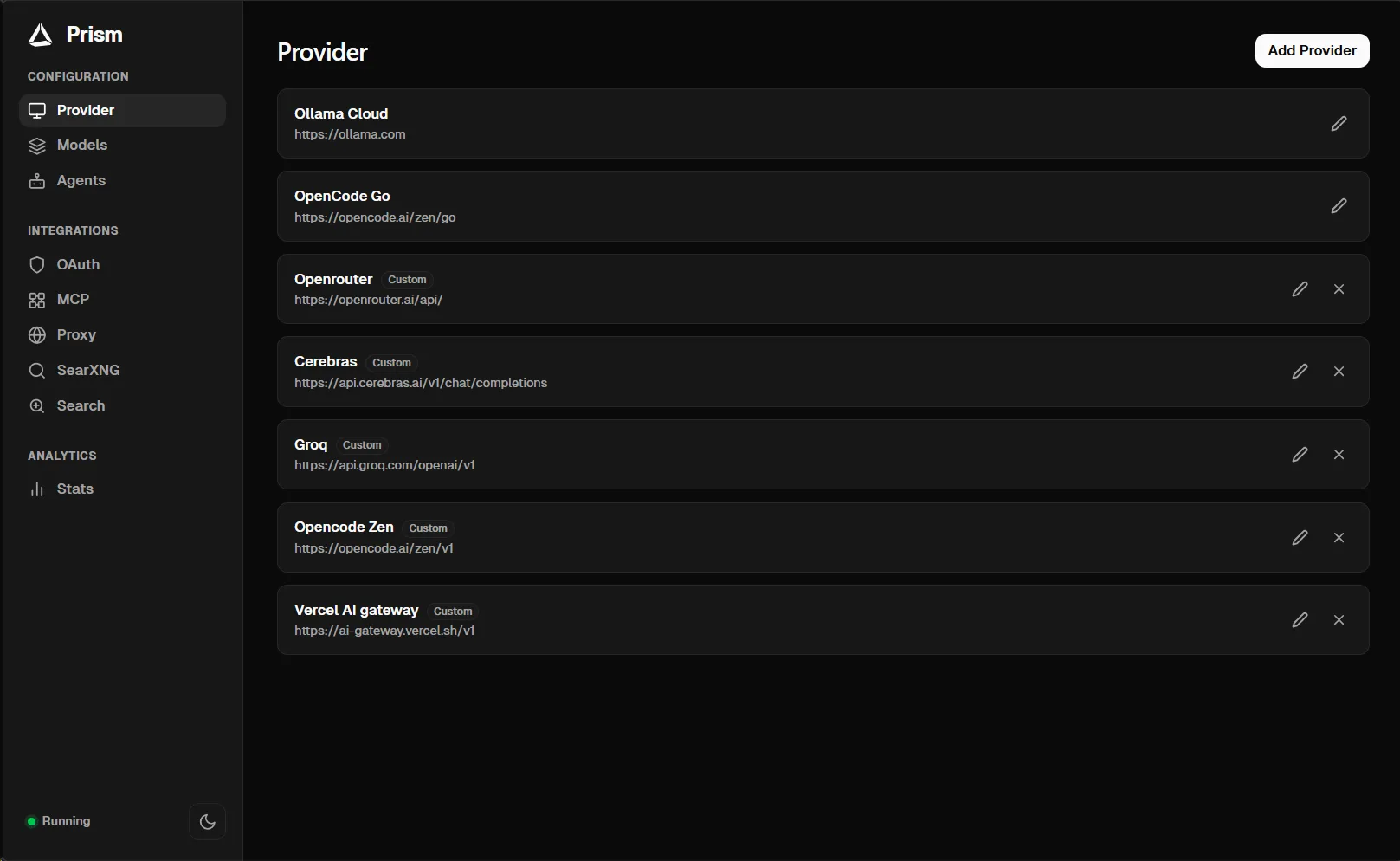
Built-in web interface at :8765/admin. Manage providers, OAuth accounts, models, and proxy status without editing JSON.
Model remapping
Alias model names on the fly. Map claude-3-5-haiku to deepseek-v4-flash without touching a single client config.
System tray & auto-start
Native system tray with start, stop, restart. Launch at login automatically, with no admin rights required.
Want the full breakdown? See all features.
One MCP endpoint. Prism holds the credentials.
MCP servers normally mean a config file and a credential per agent. Point them all at Prism instead, and manage servers once.
Two endpoints
Connect to /mcp for every enabled server, or /mcp/<agent> for one agent's allowlist only.
Credentials stay in Prism
Agents authenticate with Prism's token. Prism holds the upstream OAuth tokens and API keys, and opens the browser to sign in the first time a server is requested.
Marketplace, cached locally
Prism syncs the registry catalog into its own database, so browsing and installing servers is instant, works offline, and only re-fetches what changed.
Every transport
stdio processes and HTTP servers, started on demand. Idle child processes are reaped, and tool lists are cached for 30 seconds so one slow server cannot stall the rest.
Namespaced tools
Tools arrive as mcp__<server>__<tool>, so two servers can expose the same tool name without colliding.
Works with everything you already use
No vendor lock-in. No SDK swaps. Point your existing tools at Prism and keep working.


- Ollama Cloud
- OpenCode Go
- OpenRouter
- Groq
- Together AI
- DeepSeek
- Mistral
- Cohere
- Fireworks
- Cerebras
- Ollama
- LM Studio
- llama.cpp
- vLLM
- Codex (OpenAI) account
- Live usage limits
- Automatic refresh
What Prism actually does
Every feature is built for developers who want translation to just work, without installing a data center.
Free Web Search
Built-in SearXNG metasearch engine gives every agent free unlimited web search. No API keys, no rate limits, no Cloudflare blocks. Aggregates Google, Bing, DuckDuckGo, and more.
One-Click Agent Setup
Detects and configures 14 agents, from Claude Code and Codex Desktop to Zed, Kimi Code, Hermes and DeepSeek Harness. Each one writes its own config, and Prism keeps it in sync as your models change.
Auto Model Config
Type a model name and Prism auto-fetches all details from models.dev: context length, token limits, reasoning support, tool calling, vision, and structured outputs.
Provider-Per-Model Routing
Mix models from Ollama Cloud, OpenCode Go, custom providers, and OAuth accounts in a single session. Each model routes to its assigned provider.
Per-Model API Protocol
Send each model down the right path on its own. Chat Completions or the Responses API, chosen per model, so one session can mix both without the agent knowing.
Your Own Search Provider
Prefer a hosted search API over the bundled engine? Point Prism at Exa, Tavily, Brave, Serper, or any custom endpoint and every agent switches over.
Installs Like an App
A per-user Windows MSI that needs no admin prompt, a macOS disk image, and a portable AppImage for Linux. No runtime, no package manager, nothing to compile.
API Translation
Translates Anthropic, OpenAI Chat, OpenAI Responses, and Ollama APIs in all directions. Every routing path with full SSE streaming.
Model Remapping
Alias model names on the fly. Map claude-3-5-haiku to deepseek-v4-flash without touching a single client config.
System Tray
Native system tray on Windows, macOS and Linux with start, stop, restart, and provider switching, all from the taskbar icon.
Admin Web UI
Built-in web interface at :8765/admin. Manage providers, OAuth accounts, models, agents, and proxy status without editing JSON by hand.
Stats Dashboard
Live TPS, token counts, per-client breakdown, and historical charts. All persisted to SQLite so data survives restarts.
OAuth Support
Sign in with your OpenAI account for Codex access. No API key needed. Prism handles tokens, refresh, and usage tracking.
Full Streaming
SSE streaming works seamlessly across all routing paths. Thinking blocks, tool calls, and images included.
Auto-Start
Launch at login automatically, with no admin rights. Uses the Windows registry, a macOS LaunchAgent, or a freedesktop autostart entry on Linux.
Honest Telemetry
Anonymous install and usage counts, one heartbeat a day, off in a single click. Prompts, models, keys, URLs and file paths are never sent.
Don't see the feature you want? Request it on the feedback board.
Prism vs LiteLLM
Same translation power. Different weight class. Choose the tool that fits your workflow.
Simple, transparent pricing
Start free. Enterprise when you need it. No credit card required.
Free
Everything you need to get started. Run Prism locally with full translation support.
Enterprise
There is no paid tier today. Prism is MIT licensed and complete on its own. If your organisation needs to run it across a fleet, tell us what that would have to include.
Frequently asked questions
Everything you need to know before downloading. Can't find your answer, or want to request a feature? Post it on the feedback board.
Prism accepts Anthropic Messages at /v1/messages, OpenAI Chat Completions at /v1/chat/completions, OpenAI Responses at /v1/responses, and MCP JSON-RPC at /mcp and /mcp/<agent>. It translates between them and each upstream provider's native format in real time. There is no inbound Ollama /api/chat route; Ollama's native API is used only upstream, when you add a local Ollama server as a custom provider.
No. Prism is a single small executable with zero runtime dependencies. Just run it and it starts. No Python, no Docker, no package manager. It runs natively on Windows, macOS and Linux.
Yes. Prism bundles a managed local SearXNG metasearch engine that gives every agent free unlimited web search with no API keys, no rate limits, and no Cloudflare blocks. It aggregates Google, Bing, DuckDuckGo, and dozens of other engines. Start it from the admin UI or system tray with one click.
Prism has one-click setup for 14 agents: Claude Code, Codex Desktop and CLI, Factory Droid, OpenCode, ZCode, Zed, Oh My Pi, Grok Build, Pi, Kimi Code, Prime Agent, Empryo, Hermes and DeepSeek Harness. It auto-detects which ones are installed, writes the right config files, and keeps them in sync as your models change. Anything else that speaks OpenAI or Anthropic works too, including Cursor, Continue, Aider, Windsurf, Trae, Supermaven, Claude Desktop, or a script of your own.
Prism serves an MCP endpoint at /mcp that aggregates every server you enable, plus /mcp/<agent> for a single agent's allowlist. Agents authenticate with Prism's token while Prism holds the upstream OAuth tokens and API keys, opening your browser the first time a server needs to sign in. You browse and install servers from the MCP tab in the admin UI, and tools arrive namespaced as mcp__<server>__<tool> so two servers can share a name without colliding.
On Windows, run the per-user MSI or download prism.exe and run it directly, neither needs an admin prompt. On macOS, open the disk image and drag Prism across. On Linux, download the AppImage, chmod +x it, and run it. Prism has no runtime dependencies of its own; free web search is the only optional extra, and on first start Prism installs SearXNG into a private environment it manages for you.
Open the built-in admin UI at http://127.0.0.1:8765/admin, go to the Provider tab, select your provider (Ollama Cloud, OpenCode Go, a custom provider, or Codex OAuth), and enter your API key. You can add multiple custom providers like OpenRouter, Groq, Together AI, and DeepSeek.
Yes. Prism supports provider-per-model routing. Each model in your configuration can be assigned to a specific provider, so you can mix models from Ollama Cloud, custom providers, and OAuth accounts in a single session.
Yes. Full SSE streaming is supported across all routing paths. Thinking blocks, tool calls, and image content all stream correctly with proper event translation between formats.
Yes. Prism supports OAuth sign-in with your OpenAI account. Once authenticated, Prism manages tokens and refresh automatically. Requests route directly to the ChatGPT backend API, avoiding Cloudflare restrictions. No API key required.
In the admin UI Models tab, just type a model name and click Search. Prism queries models.dev and auto-fills context length, max output tokens, reasoning support, tool calling, vision, and structured output capabilities. No manual configuration needed.
Yes. All request stats, token counts, and TPS metrics are saved to a local SQLite database (%APPDATA%\prism\stats.db on Windows) in WAL mode. Data survives proxy restarts and system reboots.
Yes. Turn on 'Start at Login' in the admin UI Proxy tab. Windows uses the registry, macOS writes a LaunchAgent plist, and Linux writes a freedesktop autostart entry. None of it needs admin rights.
Prism sends at most one anonymous heartbeat a day so the maintainer can count installs, and you can switch it off in one click from the admin UI. The event carries a random ID, the version, your OS and architecture, and a coarse bucket of how many requests you made in the last 24 hours. Prompts, models, tokens, API keys, URLs, file paths and personal identifiers are never sent.
Your all-in-one LLM proxy
Lightweight. Native. Zero dependencies.
MIT licensed. Built in Go. Windows, macOS and Linux.